How to Choose the Right Logitech Mouse: Gaming, Work & Everyday Use
A mouse might look like a simple computer accessory, but choosing the right one can make a noticeable difference in how comfortably and efficiently you work or play.
A competitive gamer needs speed, precision, and a lightweight design. A professional may prioritize ergonomics, productivity controls, and multi-device connectivity. For everyday home or office use, simplicity, quiet clicking, reliability, and affordability may matter more.
Logitech offers mice for all of these situations. At QUTECH, our current Logitech range includes models from the professional MX Series, high-performance Logitech G gaming lineup, and affordable everyday wireless mice.
In this guide, we'll explain what to look for and help you choose the right Logitech mouse for gaming, professional work, travel, studying, or everyday use.
Gaming Mouse vs Productivity Mouse
The first question to ask is simple:
What will you mainly use your mouse for?
Gaming Mice
Gaming mice usually focus on:
- Fast response
- High-precision sensors
- Adjustable DPI
- Lightweight designs
- Programmable buttons
- Low-latency wireless technology
- Gaming software customization
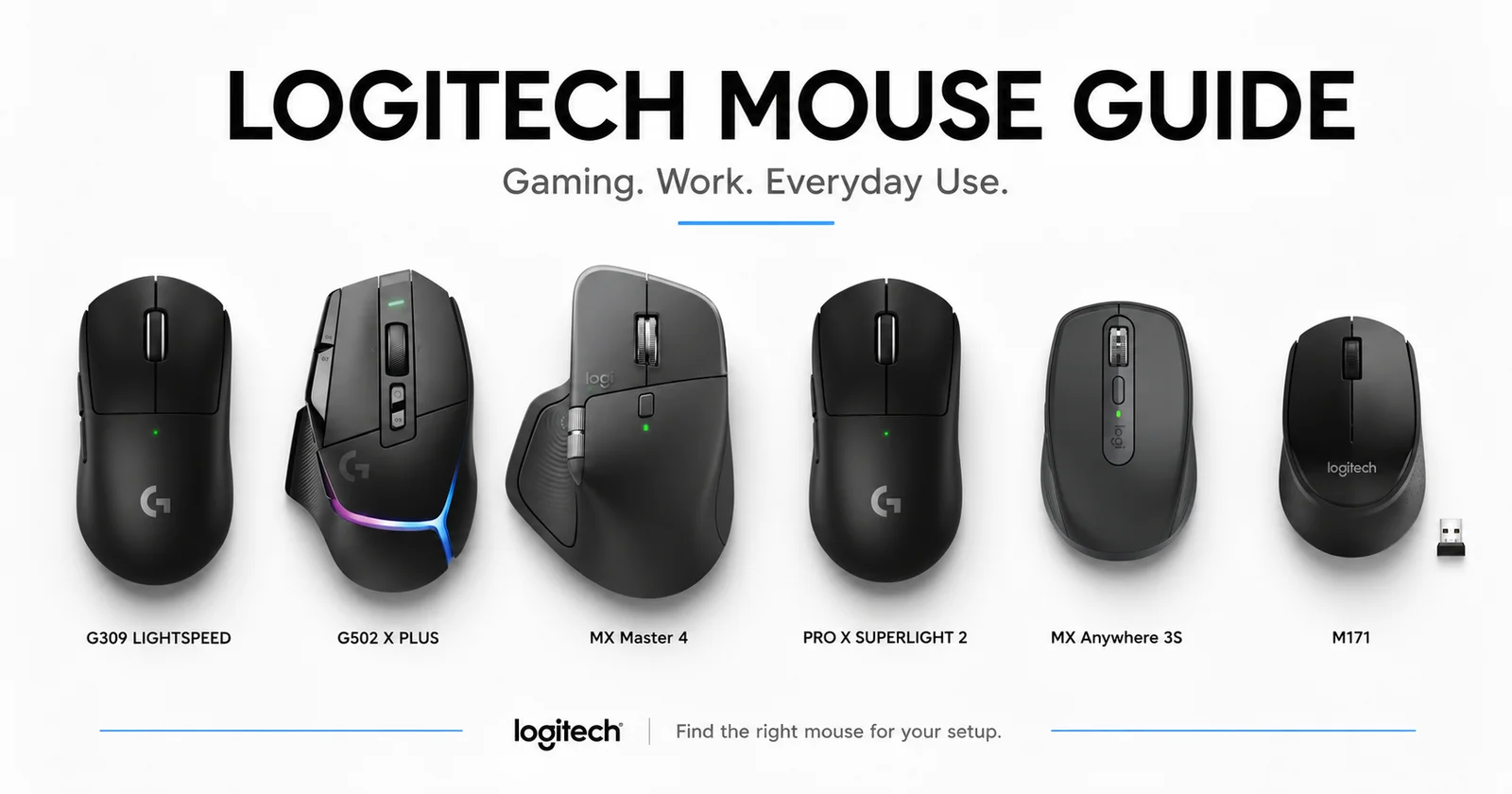
Models such as the Logitech G PRO X SUPERLIGHT 2, G309 LIGHTSPEED, and G502 X PLUS are specifically designed around gaming performance.
Productivity Mice
Productivity mice focus more on:
- Ergonomic comfort
- Advanced scrolling
- Multi-device connectivity
- Customizable shortcuts
- Quiet operation
- Long battery life
- Working across different applications
The MX Master 4 and MX Anywhere 3S are designed with productivity-focused users in mind.
Everyday Wireless Mice
For normal browsing, schoolwork, spreadsheets, and general office tasks, you may not need advanced features.
Simple models such as the Logitech M171 and M330 Silent provide easy wireless connectivity without unnecessary complexity.
Logitech G PRO X SUPERLIGHT 2: Built for Competitive Gaming
For competitive gamers, especially FPS players, mouse weight and responsiveness can make a big difference.
The Logitech G PRO X SUPERLIGHT 2 is designed around esports performance. It weighs approximately 60g and combines Logitech's HERO 2 sensor, LIGHTSPEED wireless technology and LIGHTFORCE hybrid switches. Logitech lists support for up to an 8 kHz report rate and up to 95 hours of continuous motion battery life.
Best for:
- Competitive FPS gaming
- Esports
- Counter-Strike
- Valorant
- Fortnite
- Players who prefer lightweight mice
- Gamers who prioritize speed and precision
The simple shape and low weight also make it suitable for players who don't want lots of extra buttons getting in the way.
Logitech G502 X PLUS: Feature-Packed Gaming
Not every gamer wants an ultra-light mouse.
Some players prefer additional controls, RGB lighting, an ergonomic shape, and more customization.
That's where the Logitech G502 X PLUS LIGHTSPEED comes in.
It combines Logitech's LIGHTSPEED wireless technology with a HERO 25K sensor, LIGHTFORCE hybrid switches, LIGHTSYNC RGB and 13 programmable controls. It also includes a dual-mode scroll wheel and adjustable DPI-shift button.
Best for:
- RPG games
- MMO games
- Strategy games
- Productivity + gaming
- Players who like programmable buttons
- RGB gaming setups
Compared with the SUPERLIGHT 2, the G502 X PLUS focuses more on versatility and controls than minimizing weight.
Logitech G309 LIGHTSPEED: Wireless Gaming Made Accessible
The Logitech G309 LIGHTSPEED is an excellent option for gamers who want modern Logitech gaming technology without moving immediately into the highest-end models.
It supports both LIGHTSPEED wireless and Bluetooth, uses a high-performance gaming sensor, and has a lightweight design of under 90g depending on configuration.
Best for:
- Everyday PC gaming
- Students
- New gaming setups
- Wireless gaming
- Gamers who also want Bluetooth
- Players looking for strong value
The combination of wireless flexibility and gaming-focused performance makes the G309 a good middle ground between basic wireless mice and premium esports models.
Logitech MX Master 4: Premium Productivity
Gaming isn't the only area where the right mouse can improve your experience.
For professionals, developers, designers, editors, analysts and heavy computer users, productivity features can save time throughout the working day.
The Logitech MX Master 4 is designed around advanced productivity. Logitech lists an 8,000 DPI Darkfield sensor, MagSpeed scrolling, a thumb wheel, customizable controls, Bluetooth and Logi Bolt connectivity, and a Haptic Sense Panel. It can also connect across supported operating systems and offers fast USB-C charging.
Best for:
- Office professionals
- Developers
- Designers
- Video editors
- Spreadsheet users
- Content creators
- Heavy multitasking
If your mouse is one of the tools you use for several hours every day, the MX Master series is designed for that type of workflow.
Logitech MX Anywhere 3S: Productivity Wherever You Go
The MX Anywhere 3S takes many premium productivity features and puts them into a much smaller package.
Its compact design makes it particularly suitable for laptop users and frequent travellers.
Logitech equips the MX Anywhere 3S with an 8,000 DPI Darkfield sensor that can track on many surfaces, including suitable glass surfaces, along with MagSpeed scrolling, Quiet Clicks and connectivity for up to three devices via Bluetooth. It's also compatible with the Logi Bolt receiver, which is sold separately with the standard model.
Best for:
- Laptop users
- Business travellers
- Remote workers
- Students
- Coffee-shop working
- Professionals who frequently move between locations
It provides much of the premium MX experience without requiring a large mouse in your laptop bag.
Logitech M330 Silent: Work Without the Clicking Noise
Mouse clicking can become surprisingly distracting in a quiet environment.
The Logitech M330 Silent is designed to reduce that distraction using Logitech SilentTouch technology. Logitech states that it reduces clicking sounds by more than 90% compared with its referenced standard mouse while maintaining the familiar click feel.
Its shape is designed for right-handed use and focuses on simple, comfortable wireless operation.
Best for:
- Quiet offices
- Libraries
- Shared workspaces
- Bedrooms
- Studying
- Late-night computer use
- Everyday office work
If you don't need advanced buttons but appreciate a quieter workspace, the M330 is an easy choice.
Logitech M171: Simple and Reliable Wireless
Sometimes you just need a mouse that works.
The Logitech M171 Wireless Mouse focuses on plug-and-play simplicity. Connect its USB receiver and you're ready to start working.
It has a compact ambidextrous design, making it suitable for both left- and right-handed users, and Logitech rates its battery life at up to approximately 12 months depending on usage conditions.
Best for:
- Everyday users
- Students
- Office PCs
- Home computers
- Laptop users
- Budget-conscious buyers
For browsing, documents, spreadsheets and general computer use, sometimes simplicity is exactly what you need.
Understanding DPI
DPI is one of the specifications you'll commonly see when comparing mice.
In simple terms, DPI affects how far your cursor moves when you physically move the mouse.
Lower DPI
Provides slower cursor movement and can offer more precise control.
Often preferred for:
- FPS games
- Precision aiming
- Detailed editing
Higher DPI
Moves the cursor further with smaller mouse movements.
Useful for:
- Large monitors
- Multi-monitor setups
- Fast navigation
- Certain gaming preferences
A very high DPI number doesn't automatically make one mouse better than another. Sensor accuracy, shape, weight, responsiveness and comfort are equally important.
LIGHTSPEED vs Bluetooth vs USB Receiver
Logitech mice can use different wireless technologies.
Logitech LIGHTSPEED
LIGHTSPEED is Logitech G's performance-focused wireless technology, designed for gaming where low latency and reliable responsiveness are important.
You'll find it on models such as:
- G PRO X SUPERLIGHT 2
- G309 LIGHTSPEED
- G502 X PLUS
Bluetooth
Bluetooth is convenient because compatible computers, tablets and laptops can connect without requiring a USB receiver.
It's particularly useful for:
- Laptops with limited USB ports
- Tablets
- Multi-device setups
- Travel
USB Receiver
A USB receiver provides simple plug-and-play wireless operation.
This makes models such as the M171 especially easy to set up.
Lightweight vs Ergonomic Mice
Another important factor is mouse shape and weight.
Lightweight Mice
Excellent for fast movements.
Best suited to:
- FPS gamers
- Competitive players
- Low-sensitivity gaming
The G PRO X SUPERLIGHT 2 is the standout option here.
Ergonomic & Feature-Rich Mice
Larger shapes can provide more hand support and additional controls.
Best suited to:
- Long working sessions
- Productivity
- Multi-button gaming
- Users who prefer a fuller palm grip
The MX Master 4 and G502 X PLUS fit this category better.
Which Logitech Mouse Should You Buy?
For Competitive Gaming
Choose the Logitech G PRO X SUPERLIGHT 2.
Its lightweight design and esports-focused technology make it the strongest option in this group for competitive FPS gaming.
For Feature-Rich Gaming
Choose the Logitech G502 X PLUS.
Its programmable controls, ergonomic design and RGB lighting make it ideal for gamers who want more features at their fingertips.
For Affordable Wireless Gaming
Choose the Logitech G309 LIGHTSPEED.
It provides gaming-focused wireless performance at a more accessible level.
For Professional Productivity
Choose the Logitech MX Master 4.
It is the most productivity-focused option for users who spend hours working on a computer.
For Travel & Laptop Work
Choose the Logitech MX Anywhere 3S.
Its compact design, advanced tracking and multi-device capabilities make it especially convenient for mobile professionals.
For Quiet Workspaces
Choose the Logitech M330 Silent.
It's ideal when you want simple wireless operation with significantly reduced clicking noise.
For Everyday & Budget Use
Choose the Logitech M171.
For basic home, office and school use, it delivers exactly what many users need without paying for features they won't use.
One Mouse Doesn't Fit Everyone
There is no single "best Logitech mouse" for every person.
A competitive gamer may consider the SUPERLIGHT 2 perfect, while an accountant working with spreadsheets may get far more benefit from the MX Master 4.
Before buying, consider:
- Your main use
- Hand size
- Grip style
- Mouse weight
- Number of buttons
- Bluetooth requirements
- Gaming performance
- Portability
- Noise level
- Budget
Matching the mouse to your actual needs is more important than simply choosing the most expensive model.
Why Buy Logitech Mice from QUTECH?
At QUTECH Maldives, we stock genuine Logitech mice for gamers, professionals, students and everyday computer users.
Our current range includes:
- Logitech G PRO X SUPERLIGHT 2 LIGHTSPEED
- Logitech MX Master 4
- Logitech G309 LIGHTSPEED
- Logitech G502 X PLUS LIGHTSPEED
- Logitech MX Anywhere 3S
- Logitech M330 Silent
- Logitech M171
Why shop with us?
- Genuine Logitech products
- Gaming and productivity models
- Latest wireless technology
- Options for different budgets
- Free delivery to Malé & Hulhumalé
- Ferry delivery to islands across the Maldives
Conclusion
Choosing the right mouse comes down to understanding what you need it to do.
For competitive gaming, the G PRO X SUPERLIGHT 2 prioritizes lightweight performance and precision. The G502 X PLUS offers additional controls and customization, while the G309 LIGHTSPEED provides a balanced option for everyday wireless gaming.
For work, the MX Master 4 delivers advanced productivity features, while the MX Anywhere 3S brings premium functionality to a compact travel-friendly design.
And if your needs are simpler, the M330 Silent provides quiet everyday operation, while the M171 offers straightforward and affordable wireless convenience.
Instead of buying a mouse based only on specifications, choose the model that matches how you game, work and use your computer every day.
Explore the latest collection of genuine Logitech mice at QUTECH.mv and find the right mouse for your setup.