How to Choose the Right Wi-Fi Router: A Complete Buying Guide
Introduction
A fast internet connection is only as good as the router that powers it. Many people upgrade their internet plan but continue using an old or entry-level router, resulting in slow speeds, weak Wi-Fi signals, and poor coverage throughout their home or office.
Choosing the right Wi-Fi router can significantly improve your online experience, whether you're streaming 4K videos, gaming, working from home, or connecting dozens of smart devices.
In this guide, we'll explain everything you need to know before buying a Wi-Fi router and help you choose the best networking solution for your needs.
Why Your Wi-Fi Router Matters
Your router is the heart of your network.
A quality router provides:
- Faster Wi-Fi speeds
- Better coverage
- More stable connections
- Lower gaming latency
- Improved security
- Better performance with multiple devices
- Future-ready networking
Upgrading your router is often the easiest way to improve your internet experience.
Understanding Wi-Fi Standards
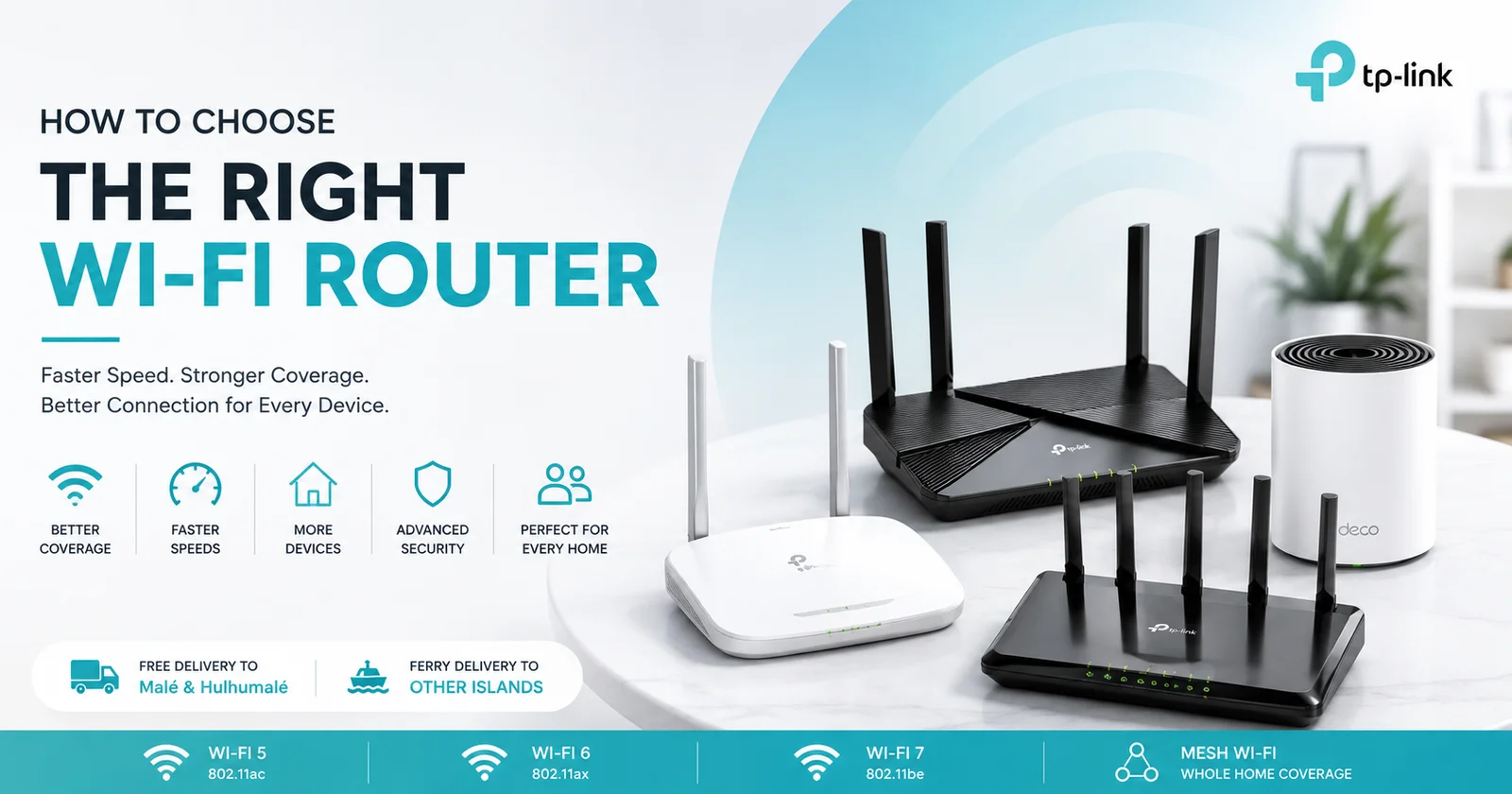
Modern routers support different Wi-Fi generations.
Wi-Fi 5 (802.11ac)
Perfect for:
- Basic home use
- HD streaming
- Video calls
- Small families
Still offers excellent performance for everyday internet users.
Wi-Fi 6 (802.11ax)
The most popular choice today.
Benefits include:
- Faster speeds
- Better efficiency
- Lower latency
- Handles more connected devices
- Improved battery life for compatible devices
Ideal for modern homes with smartphones, laptops, smart TVs, gaming consoles, and smart home devices.
Wi-Fi 7
The newest wireless standard.
Offers:
- Ultra-fast speeds
- Extremely low latency
- Better multi-device performance
- Future-proof technology
Perfect for professionals, gamers, creators, and businesses looking for the latest networking technology.
Dual-Band vs Tri-Band Routers
Dual-Band
Provides:
- 2.4GHz
- 5GHz
Suitable for:
- Most homes
- Streaming
- Video calls
- Everyday browsing
Tri-Band
Provides:
- One 2.4GHz band
- Two 5GHz bands (or one 6GHz band on newer models)
Ideal for:
- Large families
- Heavy gaming
- Smart homes
- Offices
- Multiple users online simultaneously
Choosing the Right Router for Your Home Size
Small Apartments
A standard dual-band router usually provides enough coverage.
Medium-Sized Homes
Choose a higher-performance Wi-Fi 6 router with stronger antennas for better range.
Large Homes
A Mesh Wi-Fi system offers the best whole-home coverage by eliminating dead zones and providing seamless roaming between rooms.
How Many Devices Will You Connect?
Today's homes often have more connected devices than ever.
Examples include:
- Smartphones
- Laptops
- Tablets
- Smart TVs
- Gaming consoles
- Security cameras
- Smart speakers
- Smart lights
- Smart plugs
- Robot vacuums
If your home has more than 15–20 connected devices, consider a Wi-Fi 6 router or a Mesh Wi-Fi system for smoother performance.
Gaming and Streaming
For gamers and streamers, a router with advanced features can make a noticeable difference.
Look for:
- Low latency
- Gigabit Ethernet ports
- Quality of Service (QoS)
- Wi-Fi 6 or Wi-Fi 7
- High-speed processors
These features help reduce lag and keep gameplay smooth, even when multiple devices are using the network.
Router vs Mesh Wi-Fi
Traditional Router
Best for:
- Apartments
- Small homes
- Basic internet usage
Mesh Wi-Fi
Best for:
- Large homes
- Multi-story buildings
- Homes with thick concrete walls
- Smart homes
- Users experiencing Wi-Fi dead zones
Mesh systems create a single seamless Wi-Fi network, allowing your devices to switch automatically to the strongest signal as you move around your home.
Router Placement Tips
Even the best router performs poorly if it's placed incorrectly.
For the best signal:
- Place it near the center of your home.
- Keep it elevated on a shelf or desk.
- Avoid placing it inside cabinets.
- Keep it away from microwaves and other electronics.
- Position the antennas according to the manufacturer's recommendations.
- Keep it away from thick concrete walls whenever possible.
Proper placement can greatly improve Wi-Fi coverage without spending extra money.
Why Choose TP-Link Networking Solutions?
TP-Link is one of the world's leading networking brands, trusted by millions of users worldwide.
TP-Link offers:
- Wi-Fi 6 and Wi-Fi 7 routers
- Mesh Wi-Fi systems
- Range extenders
- Network switches
- USB Wi-Fi adapters
- Bluetooth adapters
- Business networking solutions
Whether you're setting up a home network, gaming room, office, or smart home, TP-Link provides reliable networking solutions for every budget.
Which Router is Right for You?
Everyday Users
A Dual-Band Wi-Fi 5 or Wi-Fi 6 router is ideal for browsing, streaming, and video calls.
Families
A Wi-Fi 6 router provides better performance for multiple users and connected devices.
Gamers
Choose a high-performance Wi-Fi 6 or Wi-Fi 7 router with QoS, Gigabit Ethernet, and low latency.
Large Homes
A Mesh Wi-Fi system delivers fast, reliable coverage throughout your entire home.
Small Businesses
Business-grade routers, switches, and access points offer greater reliability, security, and scalability.
Why Buy Networking Products from QUTECH?
At QUTECH Maldives, we stock genuine networking products from trusted brands, including TP-Link.
Our range includes:
- Wi-Fi Routers
- Mesh Wi-Fi Systems
- Range Extenders
- Network Switches
- USB Wi-Fi Adapters
- Bluetooth Adapters
- Ethernet Accessories
Why shop with us?
- Genuine products
- Latest Wi-Fi technology
- Expert advice
- Competitive prices
- Free delivery to Malé & Hulhumalé
- Ferry delivery to islands across the Maldives
- Local warranty and support
Conclusion
Choosing the right Wi-Fi router is one of the best investments you can make for a faster, more reliable internet experience. From everyday browsing and streaming to online gaming and smart home automation, the right router ensures every device stays connected with consistent performance.
Whether you need a powerful Wi-Fi 6 router, a future-ready Wi-Fi 7 model, or a Mesh Wi-Fi system for complete home coverage, selecting the right networking equipment will improve speed, stability, and overall reliability for years to come.
Explore the latest collection of genuine TP-Link networking solutions at QUTECH.mv and build a faster, smarter, and more reliable network.